GTA VI / Chapter 1
Buck Me — GTA 6 Mission Walkthrough
Buck Me is a main story mission in Chapter 1 in Grand Theft Auto VI. Use the reported walkthrough stages below to follow its sequence; the available mission facts are listed separately.
Walkthrough stages
Go to the Fleeca Bank

About half a day after Coming Home, Lucia calls Jason and tells him that she needs a bank account to receive her community service payments. Neither of them have one, so Jason agrees to meet her at the Fleeca branch in Key Lento.
Ask About Opening an Account

Talk to the cashier inside, who will send you to the manager at the table in the right corner. Follow him to his office. Your credit is so bad that you can't open an account, so he suggests a fintech app called BuckMe.
Open BuckMe
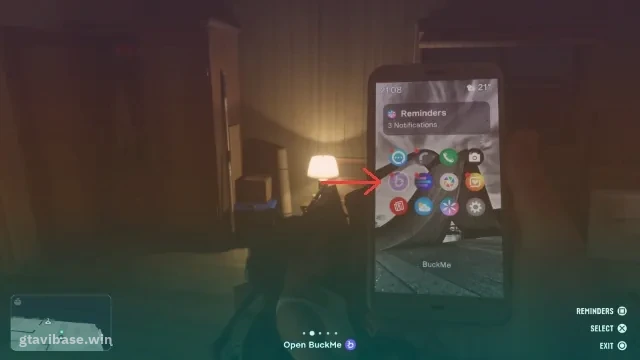
After a cutscene, you return home with $100 deposited into your checking account as a welcome bonus. Open your phone and tap the purple “B” icon to start BuckMe.
Move Money into Family Savings
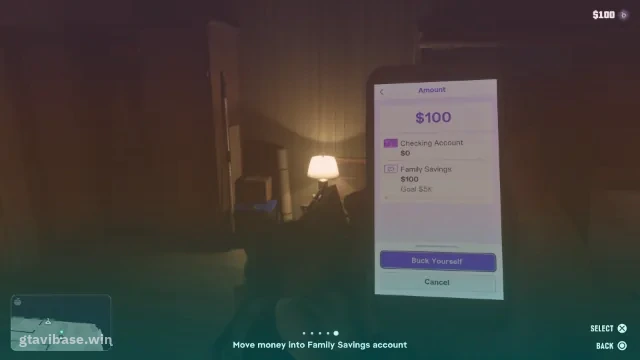
In BuckMe, open the Checking menu and use “Buck Yourself” to transfer the $100 to the family savings account.
Objectives and rewards can depend on the way you play. Check the in-game mission prompt if the sequence differs.
Mission facts
| Mission number | 13 |
|---|---|
| Mission type | main story mission |
| Chapter | Chapter 1 |
| Mission giver | Lucia Caminos |
| Playable character | Jason Duval |
| Required for 100% completion | Yes |
| Reported reward | 1 unlock |